The Frustration of Choosing an e-Learning Tool
- Steven P
- Mar 25, 2022
- 4 min read

Updated: Apr 3, 2022
I hit a massive slump this week. It's getting better but my motivation is the lowest it has been in a while. I think part of it was the intensity of getting the Proposal & Storyboard (post-extension) and the Wiki done in the same week. It required quite intense focus for a few days and I think burned me out a little.
For the Proposal and Storyboard, I found the collaborative process really enjoyable and effective overall and the result will definitely be better for the collaboration. It also relieved some of the pressure, as there were fewer things for me to think about. The design is better than anything I could have come up with and there are some big inclusions such as avatars and a second language that I never would have tried to do myself. I hope we can pull it off.
The Wiki was frustrating as the topic I was dealing with ("How to Use Markdown") involved Markdown code, but the Wiki automatically interprets some code. It uses a markup language for formatting that wasn't html or Markdown but had some elements of both (e.g., "h1 " is a large heading and "# " is a numbered list). So it required a lot of trial-and-error to get it to display correctly. The result was a little cluttered, but I feel it forms "a nutritious meal" (Baker 2013) and I was happy with it overall.

The other frustration this week was with an aspect of the Masters: a very limited focus on tools. While concepts and theories are important, I feel there should be more of an emphasis and guidance on how to use the current popular tools in the industry. The Masters covers a lot of theory topics but there is certainly scope for increasing tool teaching. The Interactive Courseware Workshop is useful but not nearly as useful as it could be.
We had a one-off, 6 hour workshop a few weeks ago where we learned the basics of HTML and a few applications, including Adobe Dreamweaver and Animate. I found this helpful both in exposing me to what is possible with these tools and focusing my attention on specific tools. It helped me to create a mental model of what an animation tool or web-design tool can do; teaching and guiding the use of one tool will invariably help with the use of similar tools.
There's possibly some method to the madness. I'm creating the Digital Learning Resource using Articulate Storyline over the next few weeks and I'd imagine I will understand a lot more afterwards. The frustration of learning in this way is just getting to me at the moment.
Picking a tool for my summer project has been quite difficult. I don't think the end-product from Articulate Storyline will be as responsive as I would like. I also only have a 28 day trial for using Articulate software and have no intention of buying it at the moment. The expense of some e-Learning software frustrates me and the idea of losing access to the software and being unable to edit my content later feels unacceptable.
Elearningindustry.com lists 167 e-learning authoring tools. Many of these are slide-based, but scrolling content can allow for a more responsive design. My positive experience with the Future Learn course has made this attractive.
The tool I've picked for the moment is called Adapt authoring tool, which isn't even on this extensive list. It's open-source software and took a couple of hours to set-up. There are multiple pre-requisite installations and the process was quite involved, though clearly explained.
I chose Adapt for a few different reasons:
The output is device-responsive.
It is scrolling-based but allows content to be hidden until previous content on the page is completed. This will allow the simulation of slide-based content.
The layout is simple, using pages (called "articles"), sections ("blocks") and columns ("components"). Each block can have one or two columns.
I could view each block as its own piece of content, allowing later reuse.
The tool is customisable with plugins made by both the creators and community.
It is HTML5 based and it is very easy to view and edit the HTML code. I want to get better at using HTML and this course will be a good end goal to have.
The following video shows a sample page created in Adapt at around the 2 minute mark:
The main issue at the moment is that I have no experience in creating an e-learning course. I don't really know what e-learning authoring tools can do and each question I have requires time and research. Adapt contains a lot of options, and while the UI is clean and welcoming, the options are overwhelming, and I don't currently understand a lot of them.
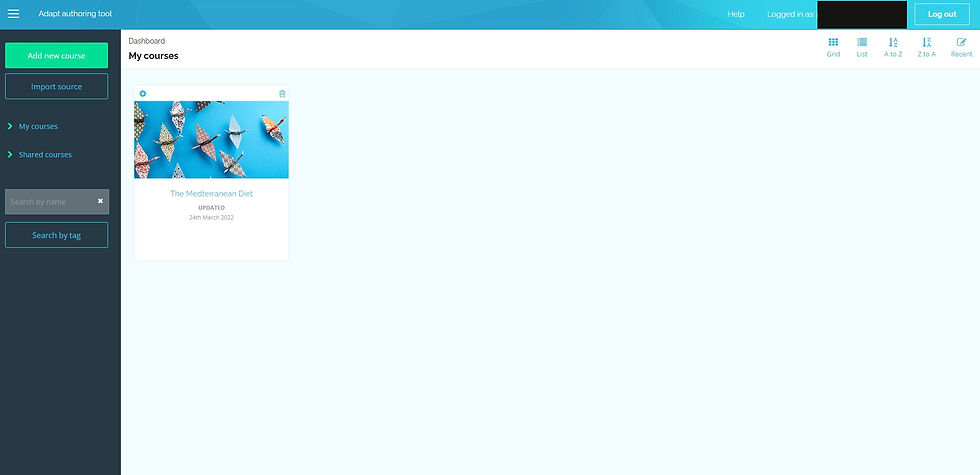
More importantly, I don't know what Adapt is NOT capable of, what ideas I will have but won't be able to create because of the tool I've chosen. For example, I don't believe that the appearance is editable in the same way a slide is; you don't have full control of 2D space the way you do in an image or slide editor. Also, accessibility features such as voice-overs could be an issue. However, it might be possible and I just don't know it yet. Given that it runs on HTML5 means that embedding content should be straightforward and potentially powerful.
However, my tool choice could easily change between now and May.
References
Adapt Learning (2022) Homepage, available: https://www.adaptlearning.org/ [accessed 25 Mar 2022].


Comments